
A small studio. A big first impression.
A better first
impression.
For your app.
Custom App Store header and search artwork, screenshot redesigns and icon directions.
By email. No card or app access needed.
Header + search artwork
Independent Footpath concepts.
Start with your listing
Find your app.
Search by name or paste your App Store link. Explore an existing concept or request a new direction for your app.
Public listings only. No app account access needed.
App Store matches
App developers.
With an eye for the first impression.
our app studio’s portfolio
We’ve built the apps.
Now we’re helping yours stand out.
Screenshot & icon study
Same app.
A clearer story.
A useful app deserves a clear introduction. Explore a screenshot redesign built around shared daily care, and see how we approach icon design at listing size.
Independent DogLog concepts · not client work
The same screen. A different introduction.
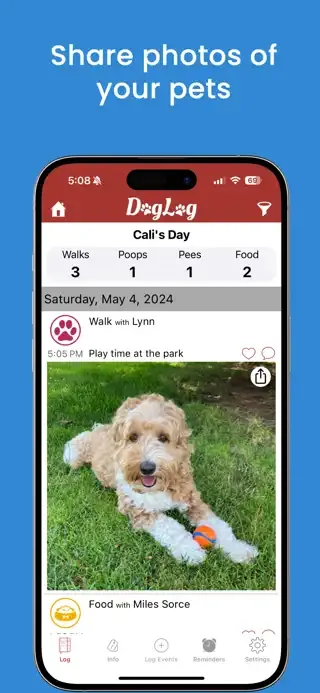
Your dog’s day.
Shared.
Photos and updates for your pack.
Source: DogLog’s public US App Store listing, captured . The proposed designs preserve the pictured app interface. They have not been adopted or performance-tested by DogLog.
The design is a proposal.
The reasoning is part of the work.
A hypothesis to test: leading with shared care may help visitors understand why the app is useful before they read its feature list. A shorter headline and warmer palette give the same app screen a new introduction, while keeping the interface aligned for a direct comparison.
Sequence, messaging and visual layout.
Screenshot work is quoted separately.
Judge the icon where people see it.


Header + search artwork
Made to feel
like your app.
Header and search artwork for different app stories.
Explore apps, categories and creative directions.
Find a style that feels right for yours.
Your app could be next. Get a free watermarked preview by email.
Independent concepts, shown for illustration. These are examples of our work, not client endorsements.
From app link to first impression
You’ve built the app.
We’ll help set the scene.
- 01
Start with your app.
Paste an App Store link, enter its ID or search by name. Your public listing gives us the starting point.
- 02
See the possibility.
Explore a watermarked concept if one is ready. Or submit your app link and email: we’ll prepare a free preview and email it to you.
- 03
Make it yours.
Review your free preview before deciding to buy. The final header + search pair is $99 USD, with one round of copy or color changes.
Start with the artwork
The creative pair.
One simple price.
A coordinated first impression, from the search result to your product page.


Want your screenshots to match?
Select screenshots when requesting your preview. Get either option or both.
Preview first. Decide later.
one time
Your app. Two placements.
One cohesive look.
- A custom product page header
- A matching search creative
- Copy and colors tailored to your app
- One round of revisions
- Final exports in the required dimensions
No subscription. No payment to view a preview.
Can I get a free preview by email before paying?
Yes. Submit your App Store link and email in the free preview form. We review requests, prepare a watermarked header and matching search artwork concept, and email it for you to review. No card, payment or app account access is needed. Buy only if you want the final artwork: the unwatermarked pair is $99 USD total per app, including one round of copy or color changes. You can also select screenshots or icon redesign in the preview request; their final scope and price are quoted separately.
Do I need to upload design files?
Your App Store link is enough to get started. We use the public icon, screenshots and description to understand your app. You can share original assets or brand guidance later if you’d like.
What if there isn’t a preview for my app?
Request one from your app’s result and leave your email. You can also add a short note about the style or message you have in mind. We’ll let you know when your concept is ready.
Can I change the copy or colors?
Yes. The creative pair includes one round of revisions, so we can refine the wording and colors around your app’s identity before preparing final exports.
Are the previews ready to upload?
Previews are watermarked concepts to help you choose a direction. After purchase and approval, we prepare the unwatermarked assets in the required dimensions for your App Store placements.
Can you also refresh my screenshots?
Yes. We can extend the direction across your screenshots, with a clear message for each screen and a consistent visual style. Select screenshots in the preview request, on their own or with header + search artwork. Previews are free; we’ll confirm the screenshot scope and price before you commit.
Can you also explore a new app icon?
Yes. We can explore a focused set of icon directions, with a clear rationale and previews at listing size. Icon projects are quoted separately from the $99 header + search pair. Select icon redesign in the preview request. Proposed designs are independent concepts until approved; performance needs testing.
Do you need access to my app or account?
No account access is needed to create a concept from your public listing. You stay in control of uploading the finished assets to App Store Connect.
The Creative field notes
Plan your app’s first impression.
Know which assets you need.
A practical visual brief and a free launch checklist.
02 · Header + searchGive your artwork a direction.
Image sizes, placement guidance and independent design examples.
03 · ScreenshotsMake each screen say something.
Plan the first three frames around the real product.
Good apps deserve a good entrance.
Let’s give yours
a fresh first impression.
Get a free preview Your App Store link is all you need to begin.